
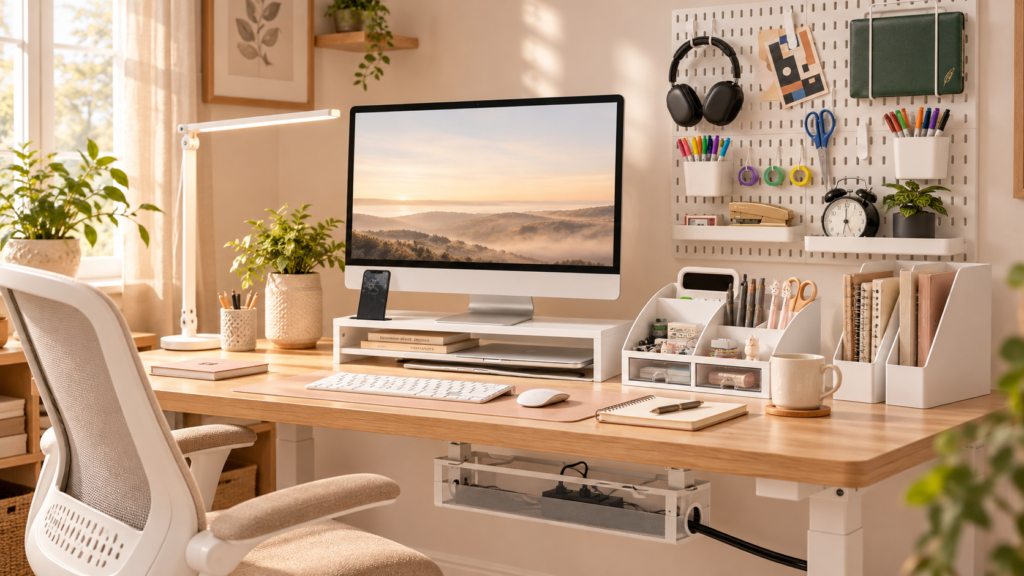
A small desk can become cluttered surprisingly quickly. Between your laptop or monitor, notebooks, pens, chargers, paperwork, and everyday essentials, it doesn’t take much for your workspace to feel crowded.
The good news is that effective small desk organization doesn’t require a bigger desk or a collection of expensive accessories. It starts with understanding what you use every day, what can be stored elsewhere, and how to make better use of the space you already have.
Whether you work from home, study in a bedroom, or use a compact desk in an apartment, these practical ideas can help you create a workspace that feels more organized and easier to maintain.
Disclosure: This article contains affiliate links. As an Amazon Associate I earn from qualifying purchases.
1. Clear the Desktop Before Adding More Storage
Before buying a desk organizer, take a closer look at what’s already on your desk. Sometimes the biggest problem isn’t a lack of storage. It’s having too many things competing for the same limited surface.
Start by removing everything that doesn’t belong in your everyday workspace. Put away unrelated items, old papers, empty cups, and supplies you rarely use.
Next, group the remaining items by purpose. Keep your daily essentials, such as your notebook, favorite pen, and frequently used charger, within easy reach. Move occasional-use supplies to a drawer, shelf, or nearby storage area.
For example, if your desk currently holds three notebooks, several spare pens, loose receipts, and charging cables, you might only need one notebook, two pens, and the cable you’re using that day. Moving the rest elsewhere can immediately free up room.
Before purchasing storage, measure the space you have left. This helps you avoid buying an organizer that solves one problem but creates another by taking up too much room.
Try this first: Spend a few minutes removing unnecessary items before deciding what kind of storage you actually need.
2. Use a Monitor Stand Riser to Reclaim Desk Space
A monitor can occupy a large portion of a compact desk, leaving little room for writing, reviewing documents, or keeping essential supplies nearby.
A monitor stand riser may help by raising the screen and creating usable space underneath, depending on its design, dimensions, and clearance. That area could be useful for storing a notebook, keyboard, or other items that fit comfortably beneath it.
If you’re considering one, the Monitor Stand Riser is an option to explore when planning a more organized desktop.
Before choosing a stand, check its dimensions against your available desk space. Confirm the weight capacity and stability requirements for your monitor, and make sure there’s enough clearance underneath for the items you want to store.
Also consider how the stand will fit alongside your keyboard and other everyday equipment. The goal is to create a more usable surface, not simply add another accessory.
3. Keep Small Supplies Together With a Compact Drawer Organizer
Pens, sticky notes, paper clips, USB drives, and other small supplies can quickly spread across a desk. When every item has a different resting place, the workspace can look messy even when you have relatively few belongings.
A compact desktop drawer organizer can give these smaller items a designated home. Instead of leaving everything in view, you can group similar supplies together and keep the desktop clearer.
Consider the Compact Desktop Drawer Organizer if you need a dedicated place for small office essentials.
Before purchasing, check the organizer’s overall footprint and the dimensions and configuration of its drawers. Think about which supplies you actually need to store and whether the organizer will leave enough space for your main work activities.
You don’t need to fill every available drawer. Keep frequently used items accessible and avoid turning the organizer into a place for forgotten stationery and miscellaneous clutter.
A useful rule: Give every everyday item a home, but don’t create storage for things you no longer need.
4. Store Papers and Notebooks Vertically
Horizontal piles of papers and notebooks can take over a small desk, especially when you’re managing several projects, classes, or household tasks at once.
Vertical storage can help you make better use of limited surface area. Rather than stacking documents across the desk, arrange current papers and notebooks upright so you can find them without moving several other items.
A Vertical File Organizer may be useful for keeping selected documents together while leaving more of the desktop available for work.
Create a simple system before adding an organizer. For example, keep current work in one designated area and reference materials somewhere else. If you regularly use a planner or notebook, give it an easy-to-reach spot.
Choose an organizer that fits the depth and width of your desk without crowding your keyboard or monitor. It’s also worth reviewing your paperwork periodically. Recycle or file documents you no longer need within reach instead of letting them accumulate.
The aim isn’t to store every piece of paper on your desk. It’s to keep the materials you genuinely use easy to find.
5. Use Wall Space With a Pegboard Organizer
When your desktop has little room left, look beyond the surface itself. The wall beside or above your desk may offer another place to organize selected supplies.
A pegboard-style organizer can provide a place for items you want to keep accessible without placing them directly on the desk. Depending on the product and its configuration, it may suit lightweight accessories or frequently used tools.
You can explore this Peg Board Wall Organizer if wall-based storage fits your workspace.
Before installing anything, check the product’s mounting requirements and confirm that the wall and installation method are suitable. If you rent your home, review your lease or ask your property manager before drilling or making permanent changes.
Keep the arrangement practical rather than overcrowded. Choose a few items you regularly reach for and leave enough open space to keep the area visually calm.
Wall storage works best when it removes clutter from your desk without turning the wall into another crowded display.
6. Manage Cables to Keep the Desk and Floor Clear
Charging cords and power cables can make a small workspace feel messy even when everything else is organized. Loose cables may hang around the desk, become tangled, or interfere with the space beneath it.
Start by identifying which cables need to stay connected. Remove unnecessary cords, group related cables where appropriate, and route them along suitable desk edges without pinching or sharply bending them. Keep power connections accessible and follow the instructions for your electrical equipment.
If your desk and setup are compatible, an Under-Desk Cable Tray may help contain cables beneath the work surface instead of leaving them scattered around the desk and floor.
Before choosing a tray, check how it attaches to the desk and whether your desk design allows for the required mounting method. Consider the placement of power connections and make sure cables won’t be stretched, trapped, or overloaded.
Avoid forcing too many cables into a single space. Follow the relevant product instructions and electrical safety guidance, and keep connections accessible when you need to inspect or unplug them.
Good cable management doesn’t have to be complicated. Even a few thoughtful adjustments can make the workspace easier to clean and maintain.
7. Choose Storage That Fits Your Actual Desk Size
One of the most common small-desk mistakes is buying organizers before measuring the available space. A storage product might look appealing on its own but leave very little room for your actual work.
Before choosing a desk organizer for a small desk, measure the width and depth of the surface, the available height around your monitor, and any usable wall space. If you’re considering under-desk storage, check the clearance beneath the desk as well.
Then identify the specific problem you want to solve.
- Not enough room for your monitor and keyboard? Consider whether a suitable riser could create more usable space.
- Small supplies scattered everywhere? Group them in a compact organizer or a drawer you already own.
- Paperwork taking over the surface? Try vertical storage or move older documents elsewhere.
- Too many visible cables? Review your cable routing before purchasing additional accessories.
- No room for another desktop item? Look at suitable wall or under-desk storage options.
These small workspace organization decisions help you spend money more thoughtfully. You may discover that rearranging your current setup solves the problem without another purchase.
Try to avoid buying several products that perform the same function. A compact workspace usually benefits more from a few well-chosen solutions than from filling every available corner with storage.
8. Create a Simple Desk Reset Routine
Even a well-organized desk can become cluttered again during a busy week. A short reset at the end of your work session can help you return the space to a usable condition.
You don’t need an elaborate system. Simply make a habit of returning everyday supplies to their designated places, putting loose papers into the appropriate organizer, and removing cups, wrappers, and unrelated items.
Check that your cables remain safely positioned and leave enough clear space for your next task. If something repeatedly ends up on the desk without a proper place, decide whether you need to store it elsewhere or give it a specific home.
You can also review the setup whenever your routine changes. For example, a student who uses textbooks every day may need a different arrangement from someone who primarily works on a laptop.
The most useful desk organization tips are the ones that fit your actual habits. Keep the routine simple enough that you can maintain it without turning tidying up into another major task.
Small Desk Organization Checklist
Use this checklist to see whether your workspace is set up to meet your everyday needs.
- I’ve removed items I don’t need every day.
- My frequently used supplies have designated places.
- My monitor and accessories fit the available desk space.
- My papers and notebooks are stored in a manageable way.
- My cables are routed safely and remain accessible.
- I’ve measured my space before buying organizers.
- I’ve avoided purchasing duplicate storage solutions.
- I can reset my desk without a major cleanup.
You don’t have to make every change at once. Start with the most frustrating source of clutter, then adjust the rest of your setup as needed.
Final Thoughts on Small Desk Organization
The best small desk organization ideas aren’t necessarily the ones that involve the most products. They’re the ones that make your workspace easier to use without taking away the room you need to work.
Start by clearing the surface, keeping everyday supplies together, storing papers vertically where practical, and managing cables safely. Measure your desk before buying anything, and choose storage based on the specific problem you’re trying to solve.
If you’re ready to organize more than just your desktop, explore our guide to home office organization ideas for more practical ways to arrange your workspace and everyday essentials.
With a few thoughtful changes, even a compact desk can become a more comfortable, functional part of your home.
Explore more home and workspace inspiration on VELORAE.
Pingback: Home Office Organization Ideas for a Productive Workspace